

Say a SaaS company builds a “Customer Health” dashboard. The query joins three tables: Customers (one row per customer), Subscriptions (one row per active subscription), and Support Tickets (one row per ticket). A customer can have multiple subscriptions and multiple tickets. The data team building the dashboard counts tickets per customer, ships the query, and moves on.
The numbers look plausible at first glance. That’s the dangerous part (perhaps you’ve been here before).
Then someone notices that customers with two subscriptions generate twice as many tickets as expected. Customers with three subscriptions generate three times as many tickets. A customer with three subscriptions and five tickets shows fifteen rows of tickets. Each ticket gets copied once for every subscription the customer holds.
The joins worked as written. The mistake was counting from the combined result without checking what each row actually represented.
That’s fan-out, and it’s why so many analytics numbers end up wrong.
Fan-out is an accidental grain change
Grain is what a single row represents. A Customers table has one row per customer. An Orders table has one row per order. Every dataset has a grain.
Fan-out happens when joining tables with mismatched grains accidentally multiplies your rows. Here’s a simple example.
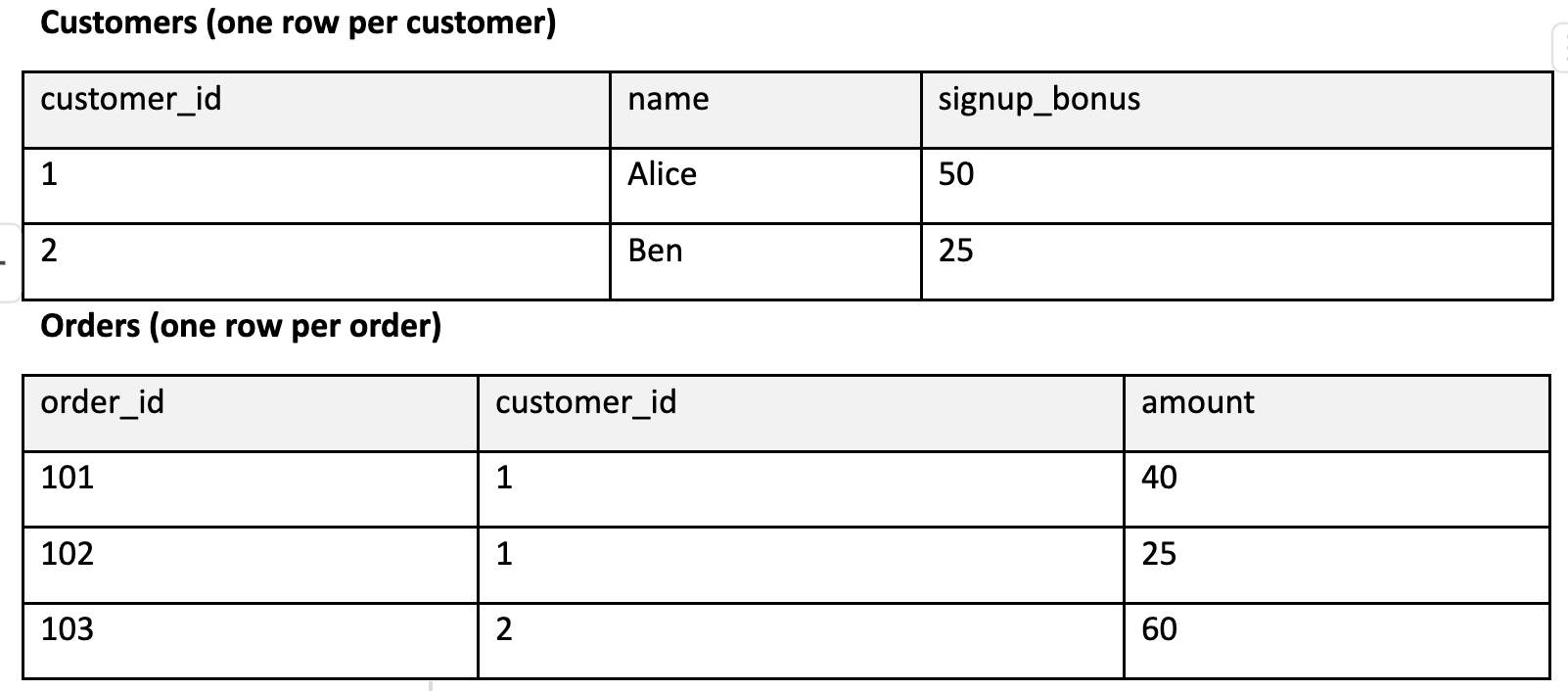
Join them on customer_id:

Since Alice has two orders, she appears twice. Count “customers” in this dataset with COUNT(*) or COUNT(customer_id), and you’ll get three instead of two. Sum the signup bonus, and you’ll get 125 instead of 75.
The join itself isn’t wrong. If you’re doing order-level analysis, this is the table you need. Problems start when you forget that the grain shifted from “one row per customer” to “one row per order,” and someone runs customer counts or sums customer-level metrics on it. The numbers are wrong even though the query succeeds and “looks plausible”.
Two one-to-many joins are worse than one
The Customers and Orders example involves a single one-to-many relationship, resulting in a clear grain: one row per order.
The Customer Health query has two separate one-to-many relationships tied to the same customer. Joining Customers to Subscriptions, and then joining Support Tickets on customer_id, pairs every subscription with every ticket for that customer. Three subscriptions times five tickets yields fifteen rows, producing a grain of “one row per subscription-ticket pairing.”
BI tools have long had names for both cases. Summing a parent-level value across child rows, as with Alice’s signup bonus, is usually called a fan trap. Two one-to-many branches meeting through a shared key, as in Customer Health, is a chasm trap.
Here’s what the broken query looks like:
-- BROKEN: joins two independent one-to-many branches before aggregating
SELECT
    c.customer_id,
    c.customer_name,
    COUNT(s.subscription_id) AS subscription_count,
    SUM(s.mrr)               AS total_mrr,
    COUNT(t.ticket_id)       AS ticket_count
FROM customers c
LEFT JOIN subscriptions   s ON s.customer_id = c.customer_id
LEFT JOIN support_tickets t ON t.customer_id = c.customer_id
GROUP BY c.customer_id, c.customer_name;
For the customer with three subscriptions and five tickets, the join produces fifteen rows before the GROUP BY collapses them:
ticket_count = 15 (should be 5)
subscription_count = 15 (should be 3)
total_mrr = five times the real monthly recurring revenue (MRR), because each subscription’s MRR is summed once per ticket
Look at what GROUP BY does here. The final output has one row per customer, so the result looks right. But the fan-out happened mid-query and got hidden by the final aggregation. That’s why this bug slips through code review.
The inflation also varies by customer. Each customer’s ticket count is multiplied by their subscription count, and their subscription count by their ticket count. A customer with one subscription gets a correct ticket count, so spot checks on typical accounts tie out. The error concentrates in your largest accounts, the ones with many subscriptions and many tickets, which leadership watches most closely.
Why COUNT(DISTINCT) is a patch
The first instinct is to swap in COUNT(DISTINCT t.ticket_id) and COUNT(DISTINCT s.subscription_id). The counts come out right. Ship it?
Look at total_mrr. Adding DISTINCT to a sum won’t fix this. SUM(DISTINCT s.mrr) will combine subscriptions that share the same price, replacing an obvious bug with a subtle one.
The patch also keeps the bug. The database still builds the full subscription-ticket cross product for every customer before deduplicating it. An enterprise account with 200 subscriptions and 3,000 tickets produces 600,000 intermediate rows to compute a single output row.
Some BI tools work around this. Looker’s symmetric aggregates produce correct sums across fan-out by deduplicating on each row’s primary key instead of its value. That only works because you declared the primary key and the join relationships in the model. Plain SQL has no such declaration, so DISTINCT can only compare values.
Relying on deduplication is a red flag. If you constantly need to deduplicate data to get a count, your joins might be multiplying rows. COUNT(DISTINCT) makes sense when you intend to change grains (like counting monthly unique users from daily session logs). Using it to clean up after an unintended row multiplication just masks the underlying join issue.
The fix: aggregate first, then join at the grain you want
Aggregate each branch to its own grain, grouped by customer, first. Then join the aggregated results at the customer level. This keeps every aggregation on a single grain and joins the branches only after each has one row per customer.
-- FIXED: compress each branch to one row per customer, then join
WITH subs_per_customer AS (
    SELECT
        customer_id,
        COUNT(*) AS subscription_count,
        SUM(mrr) AS total_mrr
    FROM subscriptions
    GROUP BY customer_id
),
tickets_per_customer AS (
    SELECT
        customer_id,
        COUNT(*) AS ticket_count
    FROM support_tickets
    GROUP BY customer_id
)
SELECT
    c.customer_id,
    c.customer_name,
    COALESCE(s.subscription_count, 0) AS subscription_count,
    COALESCE(s.total_mrr, 0)          AS total_mrr,
    COALESCE(t.ticket_count, 0)       AS ticket_count
FROM customers c
LEFT JOIN subs_per_customer    s ON s.customer_id = c.customer_id
LEFT JOIN tickets_per_customer t ON t.customer_id = c.customer_id;
Both CTEs are one row per customer_id. Joining them to Customers is one-to-one (or one-to-nothing, hence the LEFT JOIN and COALESCE for customers with no tickets or no subscriptions). The grain stays “one row per customer” throughout. The customer with three subscriptions and five tickets now shows 3 and 5.
This assumes Customers really is one row per customer. If it’s an SCD2 dimension with a row per version, or a staging table carrying duplicates from a bad load, the final join fans out all over again. Check the grain of the table you join to as well as the ones you aggregate.
Count before and after every join
Check COUNT(*) before and after joining to catch row multiplication early. Compare it with COUNT(DISTINCT) on your expected grain key.
Since GROUP BY masks fan-out in the final result, run this check on the joined rows prior to aggregating:
-- Ticket grain going in
SELECT COUNT(*) AS rows_in, COUNT(DISTINCT ticket_id) AS tickets_in
FROM support_tickets;

-- Ticket grain coming out of the join
SELECT COUNT(*) AS rows_out, COUNT(DISTINCT t.ticket_id) AS tickets_out
FROM customers c
LEFT JOIN subscriptions s ON s.customer_id = c.customer_id
JOIN support_tickets    t ON t.customer_id = c.customer_id;
If rows_out exceeds tickets_out, your join multiplied tickets. (If tickets_out is lower than tickets_in, you're missing tickets that match customer records.)
The diagnostic uses an inner join to tickets where the broken query uses a LEFT JOIN. Without the inner join, customers with no tickets would add null-ticket rows to rows_out and trigger a false alarm. Run the same pair of queries for the subscriptions branch.
For the corrected query, save it as a view so you can test it:
CREATE VIEW customer_health AS
-- the fixed query above
Then compare its grain against the source table:
SELECT
    (SELECT COUNT(*)                    FROM customer_health) AS health_rows,
    (SELECT COUNT(DISTINCT customer_id) FROM customer_health) AS health_customers,
    (SELECT COUNT(*)                    FROM customers)       AS customer_rows,
    (SELECT COUNT(DISTINCT customer_id) FROM customers)       AS customer_ids;
All four numbers should match. If customer_rows exceeds customer_ids, Customers has duplicate IDs, from an SCD2 history table or a bad load, and the fixed query inherits that fan-out at its final join.
A matching row count confirms the grain but says nothing about the metrics. Reconcile the totals against the sources:
SELECT
    (SELECT SUM(ticket_count) FROM customer_health) AS health_tickets,
    (SELECT COUNT(*) FROM support_tickets
      WHERE customer_id IN (SELECT customer_id FROM customers)) AS source_tickets,
    (SELECT SUM(total_mrr) FROM customer_health) AS health_mrr,
    (SELECT SUM(mrr) FROM subscriptions
      WHERE customer_id IN (SELECT customer_id FROM customers)) AS source_mrr;
The IN filter keeps only tickets and subscriptions with a matching customer, and unlike a join it can’t multiply rows. If health_tickets exceeds source_tickets, something upstream duplicated rows. If it falls short, tickets were dropped somewhere you didn’t expect.
Compare the counts before publishing the result.
The same problem, stored in a table
A similar counting error occurs when a table stores rows at different grains.
Sometimes a single table holds individual transactions alongside daily summary rows. Running a simple SUM(amount) on this mixed-grain layout double-counts revenue because it counts each transaction directly and again in the daily total.
This setup only makes sense in deliberate OLAP rollup tables with an explicit grain_level column where every query explicitly filters on it (e.g., WHERE grain_level = ‘transaction’). If you generate those rows with ROLLUP or GROUPING SETS, the GROUPING() function (GROUPING_ID() in some engines) flags which rows are subtotals, so you can derive grain_level instead of maintaining it by hand. Otherwise, separate the data into two tables with distinct grains.
Checks before you push a join to production
State the grain of every table in one sentence. “One row per X.” If you can’t, you haven’t decided the grain yet. That includes the table you join to.
Annotate every join with its grain effect. Add a comment like -- customers (1) to orders (N): output is one row per order. Grain changes should always be explicit.
Count before and after every join. COUNT(*) against COUNT(DISTINCT grain_key). If they disagree, find out why before anyone sees a chart.
Aggregate independent branches before joining them. Two one-to-many relationships off the same key should never meet at row level.
Treat COUNT(DISTINCT) as a question. Are you changing the grain on purpose, or cleaning up after a join?
Reconcile totals against the sources. A correct row count can still carry wrong metrics.
Keep transactions and totals in separate tables. One table, one grain.
The customer with three subscriptions filed five tickets. Your dashboard should say five.
This piece is adapted from: Mixed Model Arts, Chapters 8 (Grain: Choosing Your Level of Detail) and 9 (Counting and Aggregation: Controlling the Grain)
AI helped adapt this article and some of its examples.
I never tire of reading articles like this; this used to be my bread and butter, and I miss it.
A Note on the query in https://practicaldatamodeling.substack.com/i/221364335/two-one-to-many-joins-are-worse-than-one, and why it's enough to include just the `customer_id` attribute. (Also a reminder to myself to publish the experiment results on this, something we talked about during our first podcast recording take :))
https://ramonactruta.substack.com/i/165972943/a-note-for-modern-sql-users-when-the-database-is-smarter
I'd go even further with your "state the grain" advice - if you can't state the grain, your design has failed and you should just scrap it and restart.
Also, fully agreed that "deduplication" is a red flag. A total antipattern!